Coding agents across repositories in a unified desktop workspace.
Logonomic organises work from your existing coding CLIs by repository. Sessions, code changes, Git history, and CI results stay together, keeping each conversation close to the work it concerns.
Logonomic is in prerelease. Customer desktop and Android packages are not yet available.
Windows and Linux · Free and retail editions Perpetual desktop licences from €150 + applicable tax
Codex
Claude Code
Antigravity
Kimi Code
OpenCode
Grok Build
Qwen Code
Coding CLIs retain their existing accounts, models, and infrastructure configuration.
Logonomic Companion lets you access your desktop workspace from Android.
DESKTOP AND COMPANION
One workspace, on desktop and Android.
The agents keep running on the desktop, with the same sessions and their repository context available in Companion.
SCREENSHOT TO ADDDesktop workspaceLOGO-WORKSPACE · 1920 × 1248
The desktop keeps the repository, its running sessions, and the work being inspected together.
SCREENSHOT TO ADDCompanion connected to the desktop workspaceLOGO-WORKSPACE-PHONE · 1080 × 2190
Input from Companion reaches the same session running on the desktop.
REPOSITORIES AND SESSIONS
Each repository’s sessions and changes stay together.
Selecting a repository brings its sessions and working state into view. Branches, worktrees, changes, and workflows stay attached to it. Related repositories, such as a library and its application, retain their own contexts instead of becoming mixed across unrelated terminal windows.
Multiple CLI accounts and sessions can run side by side in independent terminals, with their activity and status visible in Logonomic. Usage and quota information is available for supported CLI accounts. The overview brings activity from every repository into one view when a broader picture is useful.
Agents can keep a working-state summary to show where work stands without reading back through the terminal.
CONVERSATION AND CODE
The conversation stays close to the changes.
An agent’s explanation is a starting point for review. Logonomic keeps the conversation beside the changed files, relevant diffs, Git history, and review records, so the explanation can be checked against the code.
You can ask an agent to show the relevant diff, move to the next change, or open CI details. Those views appear in Logonomic alongside the conversation.
An interactive directory treemap shows where the code is concentrated. Selecting a modified region opens its underlying diff directly, turning the overview into a route to the change.
SCREENSHOT TO ADDAgent conversation and the diff it opensLOGO-REVIEW · 1600 × 1000
The conversation beside the actual diff: the agent can open the view it is discussing when instructed.
FOLLOWING THE WORK
The result, and the work that led to it.
Related sessions stay connected.
One session can invoke another for implementation or review. Live sessions can also exchange messages, which you can inspect in the desktop's session details.
Use “Continue in” to start a new session in a supported coding CLI with a brief of the earlier work. Calls and continuations remain connected in the timeline.
CI results stay with the repository.
GitHub Actions and GitLab CI results appear alongside the repository’s sessions and changes. You can inspect a run, return to the conversation, and ask for an explanation or direct the next step.
SCREENSHOT TO ADDRelated sessions and continuationsLOGO-TIMELINE · 1280 × 900
An implementation or review session stays grouped with its caller. Continuations preserve that relationship.
SCREENSHOT TO ADDRepository and CI runLOGO-CI · 1280 × 900
CI results stay in the repository workspace, alongside the sessions and changes being reviewed.
Sessions and Git history
Logonomic can relate sessions and commits through its own records. When available, Git AI adds another source of provenance.
The codebase over time
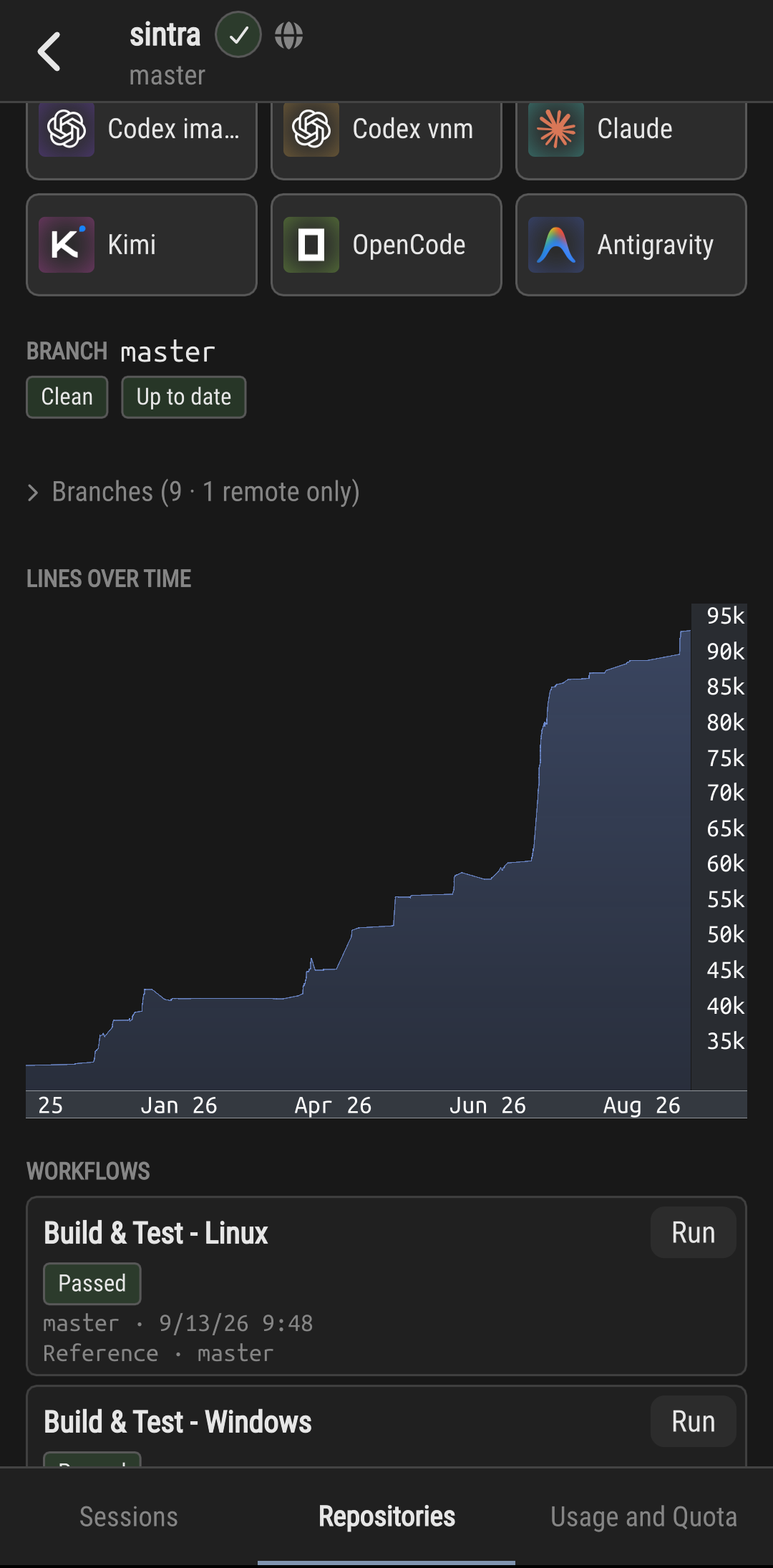
Line-count history is grouped by language and top-level directory, showing how the repository grows, contracts, and shifts between areas.
LOGONOMIC COMPANION
The same running sessions, away from the desk.
Companion connects Android to Logonomic on the desktop. Devices pair by QR code and connect directly when they share a network. When they are on separate networks, an optional Varinomics relay service can carry the connection.
Existing sessions remain interactive from Android, with questions, approvals, and further instructions reaching the desktop session. The surrounding repository context, including status and CI results, remains available alongside it, and new sessions or workflows can be started from Companion.
Logonomic Companion for Android is included with both retail desktop editions. The desktop application remains the execution environment, so it must be running and reachable for Companion to connect.
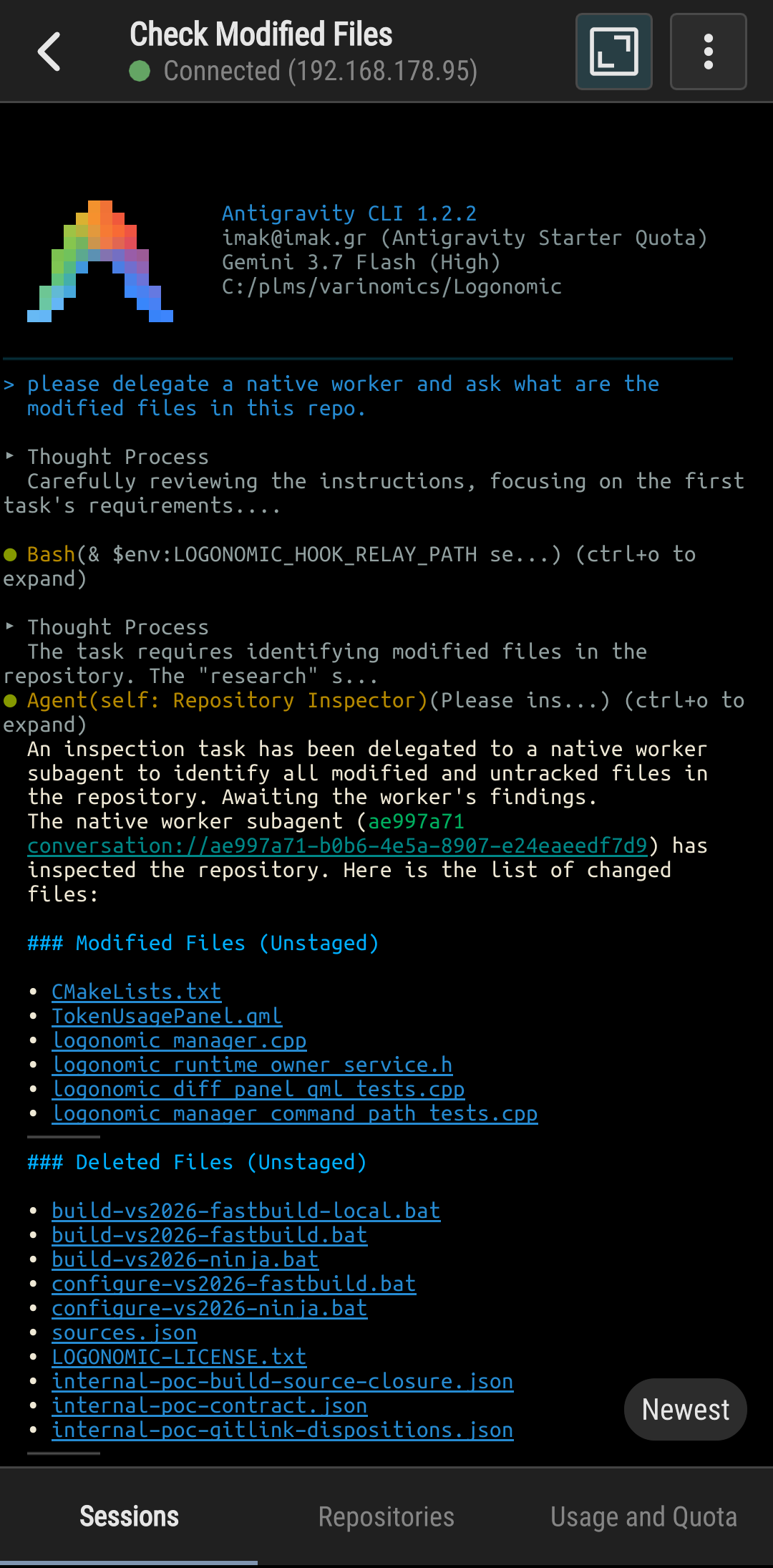
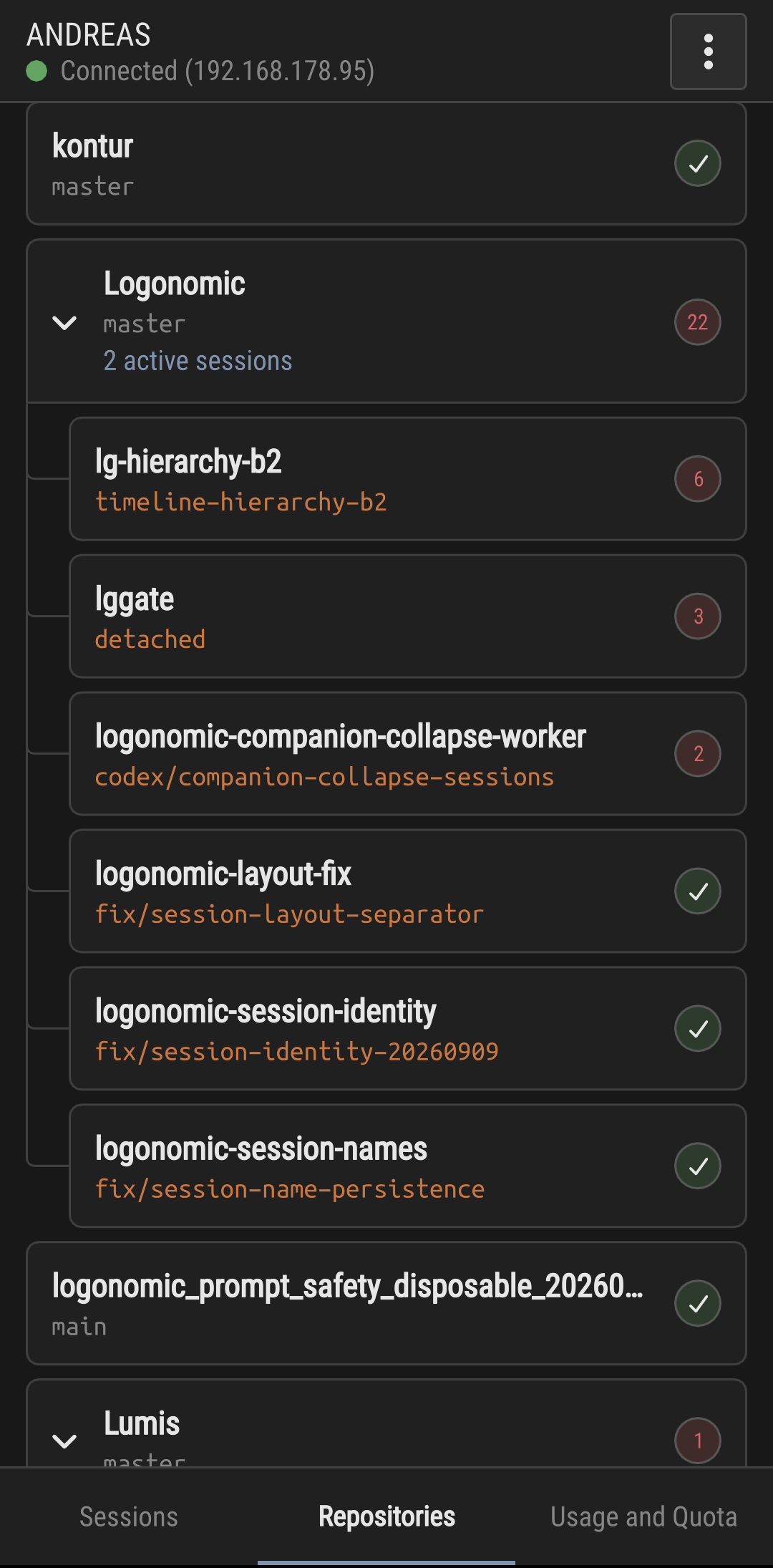
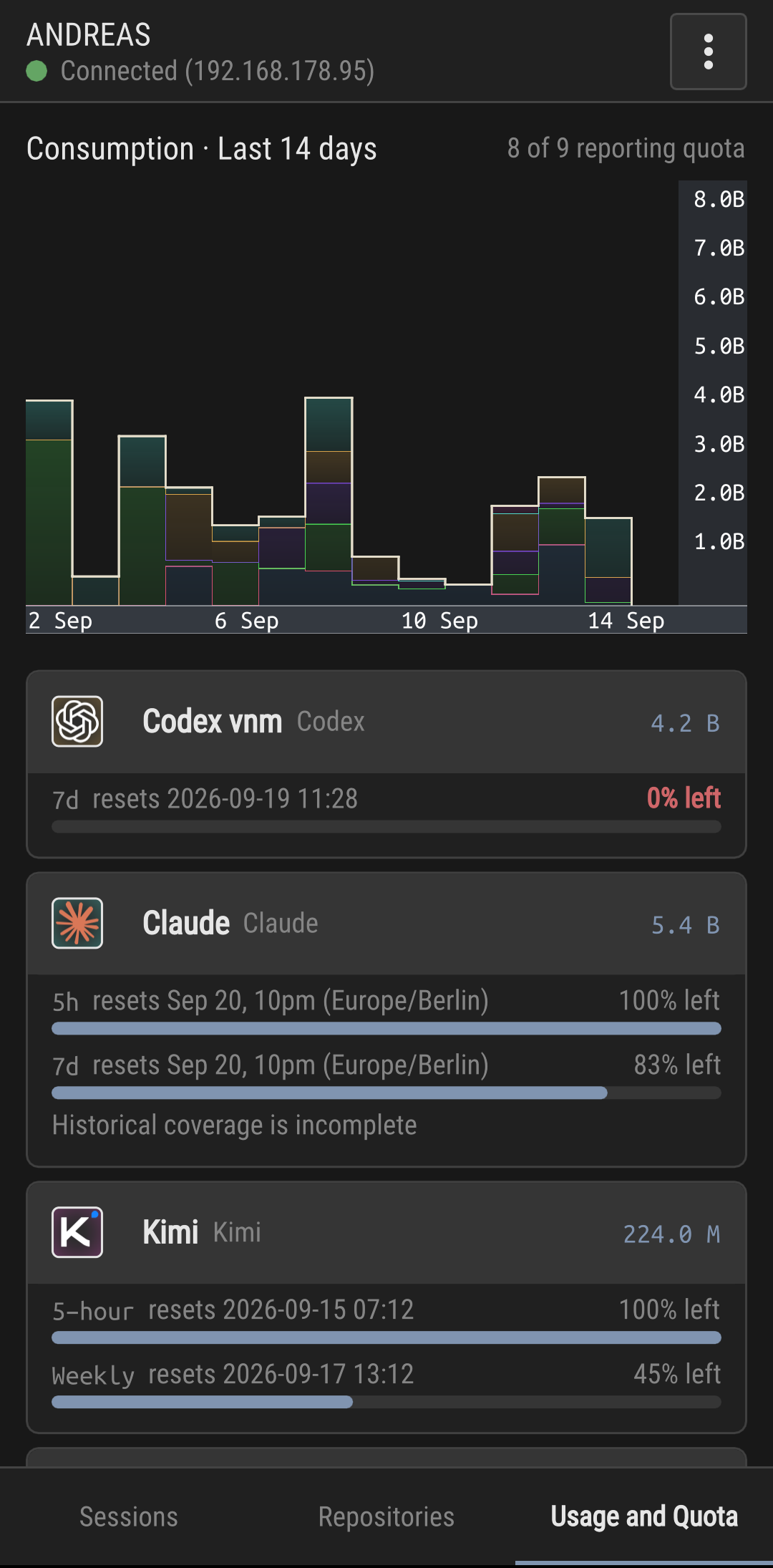
A repository-inspection session from Logonomic’s development, accessed on Android.The working repositories and their worktrees, with session and status information.The Sintra repository: configured launchers, branch status, line-count history, and build workflows.Reported quota and indicative activity for the configured coding accounts. Token totals are not directly comparable across models and providers.
PROCESS ISOLATION AND RECOVERY
Continuity beyond the main window.
Logonomic's main window runs in a separate process from its terminal sessions. If the main window crashes, Soter opens automatically with the surviving terminal sessions.
After a computer restart, Logonomic restores repository and session context. Coding CLIs with session-resumption support can reopen saved conversations.
Both retail editions include a perpetual desktop licence for personal and commercial use on Windows and Linux, twelve months of updates, and Logonomic Companion for Android. Pro adds more installations, self-hosted GitLab CI, and priority support.
No renewal is required to keep using the latest desktop version covered by your licence. Another year of updates can be purchased separately.
Early Access
Logonomic and Logonomic Pro are available to EU business customers by invoice.
To order, email [email protected] with your chosen edition, company name, billing address and VAT number.
Customer desktop and Companion packages are not yet available. Once released, Logonomic Free will be available to everyone.
IN EVERY EDITION
A workspace for agents, repositories, and review
All supported coding CLIs and real terminals
Repository overview, interactive treemaps, Git history, diffs, and review archives
Session timelines, summaries, and grouped implementation, review, and continuation sessions
Agent-to-agent messaging and controlled workspace actions
DESKTOP EDITION
Logonomic Free
The Logonomic workspace for coding CLIs, repositories, and review, with up to four terminals.
Logonomic Companion for Android is included with both retail desktop editions.
Devices pair by QR code. When they share a network, they connect directly.
Questions, approvals, and further instructions reach the existing desktop session
Repository status, CI results, and session activity remain accessible on Android
OPTIONAL SERVICE
Logonomic Companion Relay
The optional Varinomics relay service carries the connection when a direct connection is unavailable.
Buying, extending and using Relay requires an active Logonomic or Logonomic Pro licence on the same Varinomics account. Free editions and Soter do not qualify. A perpetual licence continues to qualify after its update coverage expires.
Each purchase adds twelve months of relay access. If access is still active, the new term starts at its current expiry; otherwise it starts when payment is confirmed.
Optional Varinomics relay service€50 / 12 months + applicable taxThe relay does not renew automatically.
Does Logonomic replace the coding CLIs I already use?
No. Logonomic works around and organises the coding CLIs, accounts, and sessions you already use. It brings their work together with repositories, changes, history, and CI in one workspace.
Are model subscriptions or API credits included?
No. Model access is provided through the accounts or endpoints configured in the coding CLIs. A Logonomic licence is for the desktop workspace, not a model subscription.
Does Logonomic work without my supervision?
Agents can continue working on assigned tasks without your continuous attention. You remain responsible for deciding what to assign, approve, change, and integrate.
What remains private or local?
Model requests follow your coding CLI’s configuration. Local or private infrastructure can be used where that CLI supports it. Direct Companion connections stay on the local network; the optional relay carries Companion traffic when it is used.
Does Companion work without the desktop application?
Companion connects to the workspace running on your desktop. Both the computer and Logonomic need to remain running and reachable; the coding agents run there, not on Android.
What happens after the twelve months of updates?
Retail editions have perpetual licences for personal and commercial use, with twelve months of updates included. The initial purchase has no recurring charge. The latest desktop version covered by your licence remains usable indefinitely, and another year of updates can be purchased later.
Can I try Logonomic before buying?
At release, you can try Logonomic Free before buying. For refunds and withdrawal rights, see the Refund Policy.